

 M08F Plus Touch Screen Tattoo Stencil
 M08F Wireless Tattoo Stencil
 TP81 Wireless Tattoo Template Printer
 TP31 Bluetooth Tattoo Stencil
 TP83 Wireless Tattoo
 TK32 DIY Temporary Tattoo Maker Kit
 Tattoo Transfer Paper
 Fake Skin Tattoo
 Transfer Gel
 Tattoo Carrying Case
 Tattoo Stencils
Phomemo
Phomemo M08F Wireless Tattoo Stencil Printer
$15.89
Save EXTRA $15.89 with our discount code.
Code: PM20 Copy Code


- Compact and Lightweight: Weighs only 2 lbs, 1.5" thick, dimensions 310x68x41mm
- Power and Capacity: Lithium battery, 1200mAh
- Specialized Tattoo: Advanced thermal technology, can print high-definition, precise patterns and lines
- Printing Efficiency: 1200mAh battery capacity, up to 140 pages of tattoo stencil paper continuously after charging
- High Compatibility: Compatible with a wide range of devices such as iOS and Android phones, tablets, laptops, and desktop computers
- High Definition: 203dpi for deep color imaging, smooth print results, and fast processing
- Inkless Printing: No need for ink and toner, more environmentally friendly and efficient
Learn More
Save 19% OFF with Bundles!

Phomemo M08F Thermal Tattoo Printer
The Phomemo M08F is a portable thermal tattoo stencil printer designed for clean, precise line transfer. Using inkless thermal printing technology, it creates sharp tattoo stencils without smudging or fading. With Bluetooth connectivity, rechargeable power, and a compact body, it supports fast stencil creation from mobile devices or computers—making it suitable for professional tattoo artists as well as beginners learning stencil application.


New Model vs Traditional

Using a thermal tattoo stencil printer like the Phomemo M08F significantly reduces the time and effort needed to prepare tattoo stencils. Instead of manual tracing, which can be time-consuming and skill-dependent, the printer produces clean, consistent stencil lines without ink. This makes stencil creation faster, easier to repeat, and more accessible for both professional tattoo artists and beginners learning tattoo placement.

Capable of various devices


Support systems including iOS, Android, Mac OS, Windows, Chrome OS, Linux.
Portable in multiple situations

Portable Design for On-the-Go Tattoo Work
The Phomemo M08F features a lightweight, compact body that is easy to carry between studios, events, or client locations. Its portable design allows tattoo artists to prepare stencils anytime without bulky equipment, making it suitable for mobile tattoo services, guest spots, and on-site tattoo sessions.

Portable and Professional Tattoo Stencil Experience
The Phomemo M08F thermal tattoo printer is designed to support real-world tattoo workflows, from studio sessions to on-site appointments. Its compact and lightweight design allows artists to easily carry it between workspaces, while maintaining the precision required for professional stencil printing. During use, artists can quickly generate clear tattoo stencils directly from digital designs, helping ensure accurate placement and consistent results. Whether working in a tattoo studio or providing mobile tattoo services, the M08F delivers a reliable, professional stencil experience without sacrificing portability.

Suitable Tattoo Styles
Designed with tattoo artists in mind, the Phomemo M08F-WS captures clean line work and simple shading with precision.
It’s the perfect tool for line art, geometric tattoos, minimalist designs, or fine lettering.While not intended for heavy color fills or large dark areas, it guarantees consistent, crisp transfers that make your creative process smoother and more reliable.

Phomemo M08F Tattoo Printer is Suitable for

Please be noted that:
Phomemo M08F Tattoo Stencil Printer is not suitable for:
1. complex lines; 2. color patterns; 3. large-area dark patterns;
Only applicable to:
1. simple lines; 2. black, or monochrome patterns; 3. clear line patterns
How to Use M08F Tattoo Printer

Step 1
Remove the transparent sheet, and tear out the yellow page.

Step 2
Download the app and connect to M08F-A4 via Bluetooth for phones, or via USB cable for Computer.

Step 3
1. Press and hold for 2 seconds to power on.
2. Place the white page face up and the ribbon page faces down and flush against the printer.

Step 4
Cut out the pattern and paint the arms with stencil ointment for a better transfer. Alcohol can wipe away tattoo transfer marks.
How to Use M08F Tattoo Printer
Step 1 Power on the Printer
1. Press and hold the power button for 2 seconds to turn on the printer.

2. Press both side buttons to open the printer cover.

Step 2 Prepare the Tattoo Transfer Paper
1. Remove the second transparent protective paper

2. Tear off the yellow sheet completely.

Step 3 Feed the tattoo transfer paper
1. Place the tattoo transfer paper with the white side facing up and the purple carbon side facing down, ensuring it’s aligned against the printer feed.
2. Close the printer cover securely.

Step 4-1 Print Via PC
1. Download the M08F-WS driver for PC from Phomemo drivers (Portable Printer > M08F > Drivers).
2. Connect your PC to the printer using a USB cable; M08F-WS will appear under Devices and Printers.

3. When printing tattoo stencils from software like Microsoft Office, Photos, or Chrome, select M08F-WS as the printer.

Step 4-2 Print Via Mobile Device
1. Search for Phomemo in the App Store or Google Play, then download and install the Phomemo App.
2. Connect to M08F-WS via Bluetooth in the app’s device list.

3. Create or import your tattoo design or use a template in the app, and print directly with editing options.

Step 5 Transfer the Tattoo
1. Cut out the printed tattoo pattern and carefully peel off the purple layer.

2. Apply stencil ointment evenly on the skin or practice skin to improve transfer quality.

3. Press and transfer the tattoo stencil onto the prepared area. Use alcohol to remove unwanted tattoo transfer marks.

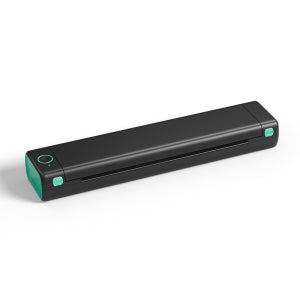
M08F-Tattoo

TP31
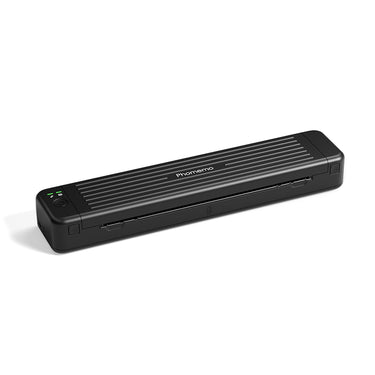
TP81
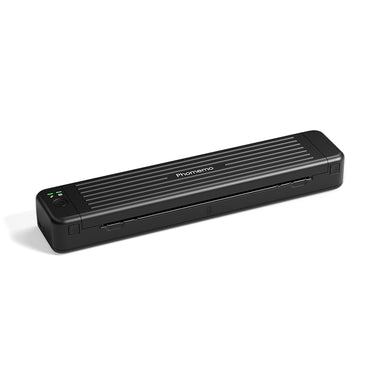
TP83

TP87
| M08F-Tattoo |
| TP31 |
| TP81 |
| TP83 |
| TP87 |
| Product Size(mm) | Paper Size(mm) | Weight(g) | Power Supply | Support PC Version | Printing Speed(mm/s) | Battery Capacity(mAh) | DPI | |
|---|---|---|---|---|---|---|---|---|
|
| 310*68*41mm | Letter | 715g | Lithium Battery | √ | 13-15mm/s | 1200mAh | 203DPI |
|
| 145*70*54mm | 80mm | 450g | Lithium Battery | × | 10-15mm/s | 2200mAh👍 | 203DPI |
|
| 310*67*40mm | Letter | 715g | Lithium Battery | √ | 10-15mm/s | 1200mAh | 203DPI |
|
| 310*67*40mm | Letter | 715g | Lithium Battery | √ | 10-15mm/s | 1200mAh | 203DPI |
|
| 310*67*40mm | Letter | 715g | Lithium Battery | √ | 10-15mm/s | 1200mAh | 203DPI |
How to Use M08F Tattoo Printer
Step 1 Power on the Printer
1. Press and hold the power button for 2 seconds to turn on the printer.
2. Press both side buttons to open the printer cover.
Step 2 Prepare the Tattoo Transfer Paper
1. Remove the second transparent protective paper
2. Tear off the yellow sheet completely.
Step 3 Feed the tattoo transfer paper
1. Place the tattoo transfer paper with the white side facing up and the purple carbon side facing down, ensuring it’s aligned against the printer feed.
2. Close the printer cover securely.
Step 4-1 Print Via PC
1. Download the M08F-WS driver for PC from Phomemo drivers (Portable Printer > M08F > Drivers).
2. Connect your PC to the printer using a USB cable; M08F-WS will appear under Devices and Printers.
3. When printing tattoo stencils from software like Microsoft Office, Photos, or Chrome, select M08F-WS as the printer.
Step 4-2 Print Via Mobile Device
1. Search for Phomemo in the App Store or Google Play, then download and install the Phomemo App.
2. Connect to M08F-WS via Bluetooth in the app’s device list.
3. Create or import your tattoo design or use a template in the app, and print directly with editing options.
Step 5 Transfer the Tattoo
1. Cut out the printed tattoo pattern and carefully peel off the purple layer.
2. Apply stencil ointment evenly on the skin or practice skin to improve transfer quality.
3. Press and transfer the tattoo stencil onto the prepared area. Use alcohol to remove unwanted tattoo transfer marks.
FAQs
Frequently Asked Questions
Is the Phomemo M08F suitable for professional tattoo artists?
Yes. The Phomemo M08F is designed for professional tattoo artists who need consistent stencil quality in studios, guest spots, and mobile tattoo sessions. It delivers clean, sharp stencil lines suitable for detailed tattoo work.
What devices can I use with the M08F tattoo printer?
The M08F works with iOS, Android, Windows, and macOS devices. Tattoo artists can easily print stencils directly from smartphones, tablets, or laptops using Bluetooth or USB connections.
Can the M08F handle fine line and detailed tattoo designs?
Yes. With high-resolution thermal printing, the M08F accurately reproduces fine lines, small text, and detailed tattoo artwork, making it ideal for realism, linework, and lettering styles.
What type of tattoo stencil paper should I use?
The M08F is compatible with standard thermal tattoo transfer paper commonly used in professional tattoo studios. No ink or toner is required.
Is the M08F tattoo printer portable for guest spots or conventions?
Yes. Its lightweight and compact design makes the M08F easy to carry for conventions, guest tattoo sessions, and on-site work.
Does the M08F require ink or cartridges?
No. The M08F uses direct thermal printing technology, so there is no need for ink, ribbons, or cartridges.
How reliable are the stencils for long tattoo sessions?
When printed on quality thermal transfer paper, M08F stencils remain clear and stable throughout extended tattoo sessions.
New Model vs Traditional

Capable of various devices

No Matter You're Officer or Tattoo Artist


Phomemo M08F Tattoo Printer is Suitable for

Please be noted that:
Phomemo M08F Tattoo Stencil Printer is not suitable for:
1. complex lines; 2. color patterns; 3. large-area dark patterns;
Only applicable to:
1. simple lines; 2. black, or monochrome patterns; 3. clear line patterns
How to Use M08F Tattoo Printer

Step 1
Remove the transparent sheet, and tear out the yellow page.

Step 2
Download the app and connect to M08F-A4 via Bluetooth for phones, or via USB cable for Computer.

Step 3
1. Press and hold for 2 seconds to power on.
2. Place the white page face up and the ribbon page faces down and flush against the printer.

Step 4
Cut out the pattern and paint the arms with stencil ointment for a better transfer. Alcohol can wipe away tattoo transfer marks.



