

PM246 サーマル印刷 一般的な質問
印刷時にプリンターが大きな音を立てる
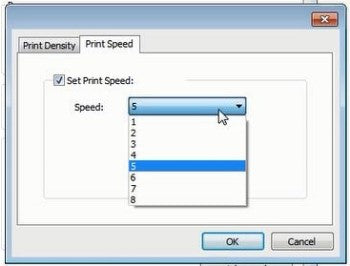
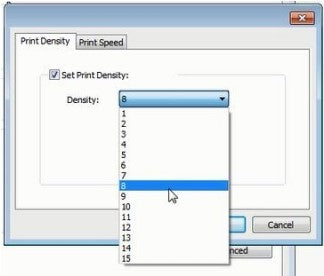
1. これは最も可能性が高い原因として、印刷速度が低すぎるか、濃度が高すぎることが考えられます。印刷速度を「5 in/sec」、濃度を「4」に設定して印刷してください。
2. 濃度と印刷速度の正確な数値は使用しているラベルの種類によって異なります。まずは4と4から始めることをおすすめします。印刷が薄い場合は、より濃くするために濃度設定の数値を上げてください。
Macの場合:
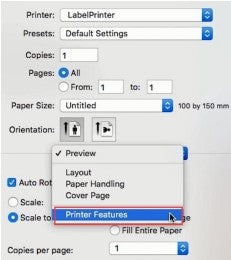
① 「プレビュー」で「Printer Features」を選択します。
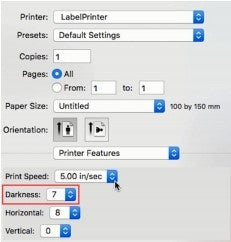
② 「Darkness」で印刷濃度を設定します。
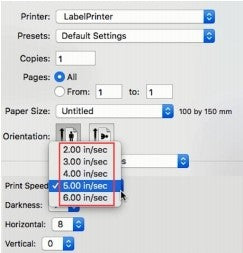
③ 「Print Speed」で印刷速度を設定します。
Windowsの場合:
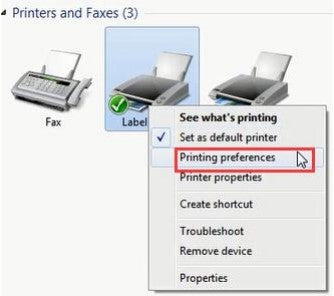
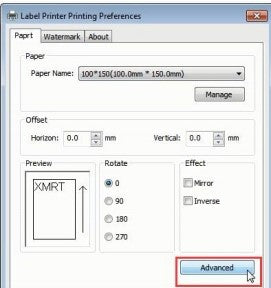
① 「デバイスとプリンター」を開き -> 「Label Printer」を右クリック -> 「プリンターの環境設定」を選択 -> 「詳細設定」をクリックします。
② 「Speed」で印刷速度を設定します。
③ 「Density」で印刷濃度を設定します。
2. 濃度と印刷速度の正確な数値は使用しているラベルの種類によって異なります。まずは4と4から始めることをおすすめします。印刷が薄い場合は、より濃くするために濃度設定の数値を上げてください。
Macの場合:
① 「プレビュー」で「Printer Features」を選択します。
② 「Darkness」で印刷濃度を設定します。
③ 「Print Speed」で印刷速度を設定します。
Windowsの場合:
① 「デバイスとプリンター」を開き -> 「Label Printer」を右クリック -> 「プリンターの環境設定」を選択 -> 「詳細設定」をクリックします。
② 「Speed」で印刷速度を設定します。
③ 「Density」で印刷濃度を設定します。

BestSellersコレクション
ベストセラーのビジネス用ラベル ラベルプリンター




