Se etichetta È ottenere incollato (Generalmente durante stampa qualcosa Veramente buio come COME UN codice a barre O UN spesso Dritto linea), questo È maggior parte probabile dovuto A IL alto stampa densità Di tuo etichetta. Questo cause IL etichetta A Ottenere pure caldo E Ottenere attaccato al Printhead.In infatti, etichette diverse richiedono un riscaldamento diverso temperatures.Set la velocità di stampa a "4 pollici/sec" e la densità a "2" e riprova a stampare. Se l'etichetta è troppo chiara, aumenta la densità di 1.
Per Mac
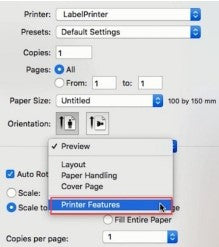
①Seleziona "Stampante Caratteristiche" In "Anteprima"
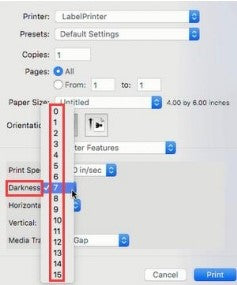
②Impostato IL stampa densità In "Oscurità"
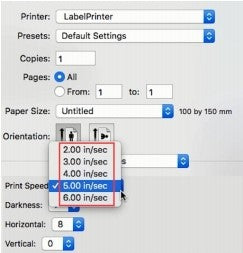
③Impostato IL stampa velocità In "Stampa Velocità"
Per Finestre
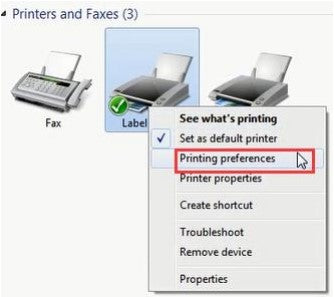
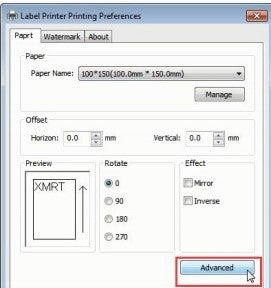
①Apri "Dispositivi E Stampanti”-&gran parte; Giusto clic SU "Etichetta Stampante"->scegli "Preferenze stampante"->clicca su "Avanzate"
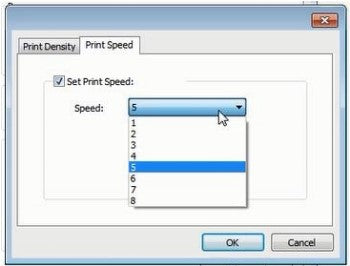
②Impostato IL stampa velocità In "Velocità"
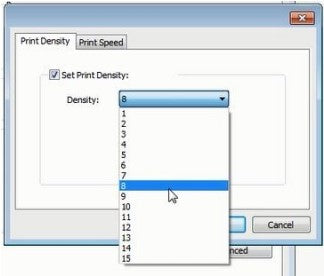
③Imposta IL stampa densità In "Densità"



 IT
IT
 EU
EU