
 Business Label Maker
 Shipping Label Printer
 Tattoo Stencil Printer
 Mini Printer
 Home Label Maker
 New Arrivals
 Phomemo M221 Bluetooth Portable Thermal Business Label Maker
 Phomemo M200 Bluetooth Portable Thermal Business Label Maker

 Phomemo PM344-WF Shipping Label Printer 300DPI WiFi
 Phomemo PM64D Bluetooth Shipping Label Printer Upgraded Direct Touchscreen
 Phomemo M08F Wireless Tattoo Stencil Printer
 Phomemo TP83 Wireless Tattoo Stencil Printer
 Phomemo T02 Inkless Mini Printer
 Phomemo M04S Mini Thermal Printer
 Phomemo P15 Vintage Ribbon Printer
 Phomemo D30 Portable Bluetooth Home Label Maker
 Phomemo Direct Thermal M08F Letter & A4 Portable Printer
 Phomemo Direct Thermal Portable Printer M832 Upgrade
 Phomemo Thermal Portable Printer M832D Upgraded Direct Touchscreen
 Phomemo TK20 Bluetooth Temporary Tattoo Printer with 40Pcs Temporary Tattoo Paper & 4 Markers
 Phomemo P3M AI Sticker Mini Printer
 Phomemo 40×30mm White Thermal Label for M110/M120/M150/M200/M220/M221-3 Roll
 Phomemo 50×80mm White Thermal Label For M110/M120/M200/M220/M221
 Phomemo More Sizes Label Sales for Business Label Maker
 Phomemo 4"x6" Fan-Fold Thermal Direct Labels for Shipping Label Printer
 Phomemo 2" Multiple Thermal Round Label for Shipping Label Printer
 Phomemo 2" Silver Thermal Holographic Sticker for Shipping Label Printer
 Phomemo Tattoo Transfer Paper For M08F/TP81/TP83/TP87 Tattoo Printer
 Phomemo Tattoo Transfer Paper For TP31 Tattoo Printer
 Phomemo Upgraded Tattoo Transfer Paper For M08F/TP81/TP83/TP87 Tattoo Printer
 Phomemo 53mm 20-year Lasting White Sticker Thermal Paper for M02/M02S/M02Pro/M03/M04S/M04AS/M832/P2S丨3 Rolls
 Phomemo 53mm White Sticker 10-Year-Lasting Thermal Paper for T02/M02X/M832丨3 Rolls
 Phomemo 110mm Paper for M04S/M04AS/M832 | 3 Rolls
 Phomemo 12mmx5m Pastel Blue&White&Red Ribbon Label Tapes for P15/A30
 Phomemo 12x40mm White Label for D30/D35/Q30/Q30S
 Phomemo 14x40mm Golden Thermal Label for D30/D35/Q30/Q30S
 Phomemo Quick Dry 8.26"x11.69" A4 Thermal Paper for M08F/M832/Q302
 Phomemo 2/4 Rolls Thermal Paper For M832 Portable Printer
 Phomemo Letter & A4 Paper for M08F/M832/Q302 | Free Storage Bag
If you’ve ever tried making your own labels in Word, you probably know—it’s possible, but not exactly quick. Whether you're organizing your home, preparing packaging for your small business, or labeling school supplies, Microsoft Word does offer a way to create printable labels from your computer. In this guide, we’ll walk through the steps to do that, and we’ll also share an easier, faster option for those who label regularly.
How to Make Labels in Microsoft Word
Word has a built-in tool specifically for label templates. Here's how you can create your own, If you want more professional and video support, you can also visit here for that:
Step 1: Open a Blank Document
Launch Microsoft Word and open a new blank document.
Step 2: Go to “Mailings” Tab
Click on the Mailings tab in the toolbar at the top.
Step 3: Click “Labels”
Click on Labels in the ribbon. A dialog box will pop up. Under “Address,” you can type what you want to appear on the label.
Step 4: Click “Options”
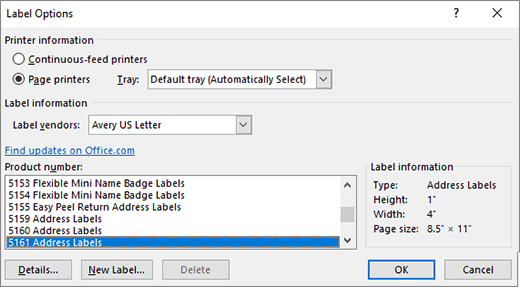
In the same dialog box, click on Options to choose your label product (such as Avery). Select the label vendor and product number that matches your label paper.
Step 5: Click “New Document”
Once your label type is selected, click New Document. Word will open a sheet with label outlines you can type into individually.
Step 6: Customize and Print
Now you can format fonts, add images or barcodes (if needed), and then print using your regular printer.
📝 Tip: Always test print on regular paper first to make sure the alignment matches your label sheet.
Why This Process May Not Work for Everyone
Using Word to make labels works—but it can be tedious, especially if you need to:
-
Make labels on the go
-
Customize designs quickly
-
Print just one or two labels at a time
-
Avoid dealing with full sheets of label paper and alignment issues
If you're labeling frequently—say for a small shop, personal organization, or events—this method might feel like more effort than it's worth.
A Simpler Alternative: The Phomemo D30 Compact Label Printer
If you're looking for a way to create labels instantly, without needing a computer or fiddly templates, the Phomemo D30 is a great tool to consider.

Here’s why many people switch to a dedicated label maker like the D30:
-
📱 Print directly from your phone using a free app
-
🧩 Choose from 100+ templates—no design experience needed
-
🎨 Add emojis, icons, barcodes, QR codes, and more
-
💨 Create and print a label in under 30 seconds
-
👜 Compact and portable—carry it in your bag
It’s inkless, wireless, and super intuitive—making it ideal for busy people who want to get organized without getting overwhelmed.
Final Thoughts
Yes, Word can make labels—but it’s not always the most efficient tool. For people who label occasionally and already have label sheets, it does the job. But if you need more flexibility, faster results, and less setup, a compact label printer like the Phomemo D30 might be worth a look.
No software headaches. No alignment issues. Just tap, type, and print.


