


Imagine transforming your everyday coffee experience with custom stickers that reflect your unique style. Coffee shop owners can use the Phomemo M110 Label Maker to brand cups, jars & packaging with custom logos and labels.
At home, coffee lovers can print fun quotes or aesthetic stickers to add a personal touch to their brews. Creating custom coffee stickers has never been this easy—or this fun.
In the video above, we take you through the simple yet exciting process of designing and printing your own coffee stickers. From choosing a theme to applying the finished stickers, you’ll see just how effortless it can be with the Phomemo M110 handheld label maker. Let’s dive into the step-by-step process of bringing your sticker ideas to life!
Steps to Create Coffee Stickers
Creating your coffee stickers starts with the fun of design. Here’s how to get started:
Step 1: Design Coffee Stickers
-
Choose a Theme: The first step is to decide on a theme for your coffee stickers. Whether it's a cozy winter theme, a playful summer vibe, or simply coffee-related quotes and graphics, the theme sets the tone for your design.
-
Find Inspiration: Inspiration is everywhere! You can explore online platforms like Pinterest, browse through design magazines, or even draw inspiration from your surroundings—like the cozy ambiance of your favorite coffee shop or the intricate patterns on a coffee bean sack.
-
Choose a Design Software Tool: Open the 'Print Master' app on your smartphone or tablet. This app offers a vast collection of free templates, making it easy to either select a pre-made design or start from scratch.
-
Start Designing: Once your theme is set, dive into the design process. Add text, graphics, and other elements to bring your vision to life. The app allows you to adjust the size, font, and layout, ensuring your stickers are exactly how you imagined them.
Step 2: Print Coffee Stickers via Print Master
Now that your design is ready, it’s time to print your coffee stickers using the Phomemo M110 label maker:
-
Connect to M110 via Bluetooth: The Phomemo M110 connects seamlessly to your device via Bluetooth. It takes just two seconds to establish the connection, so you can get started right away.
-
Select Appropriate Thermal Stickers: Depending on the look you’re going for, choose the appropriate label paper. The M110 can print on various types of label papers, from matte to glossy to transparent.
-
Adjust Print Settings: Before printing, make sure to adjust the print settings. You can tweak the darkness and other parameters to ensure your stickers come out looking crisp and vibrant.
-
Start Printing: Hit the print button and watch as your designs are brought to life with the M110’s ink-less printing technology. The result? High-quality stickers that are ready to be applied!

Step 3: Applying the Coffee Stickers
-
Carefully Apply the Sticker: Position the sticker on your coffee cup, bag, thermos, or gift packaging.
-
Smooth Out with Your Finger: To avoid air bubbles and ensure a smooth finish, gently press the sticker with your finger as you apply it. This simple step ensures your stickers have a professional look, free from wrinkles or bubbles.

Key Features and Functions of Phomemo Label Maker M110
The Phomemo M110 label maker is a versatile tool that offers several features to enhance your creative projects:
-
Ink-less Printing Technology: Forget about messy ink cartridges! The M110 uses direct thermal printing technology, providing fast, clear, and eco-friendly results.
-
Adjustable Paper Holder: Whether you're printing tiny labels or larger ones, the M110's adjustable holder can accommodate label sizes ranging from 20mm to 50mm.
-
Free Printer App: The app Print Master is a treasure trove of templates and editing tools, making it simple to design and print your stickers.
-
Bluetooth Connection: Enjoy the convenience of a wireless connection with a range of up to 33 feet. The M110 connects to your device in just two seconds, allowing for quick and easy printing.
-
OCR Technology: Need to digitize text from an image? The M110's OCR (Optical Character Recognition) technology can recognize text in just four seconds, making it easier than ever to incorporate scanned elements into your designs.
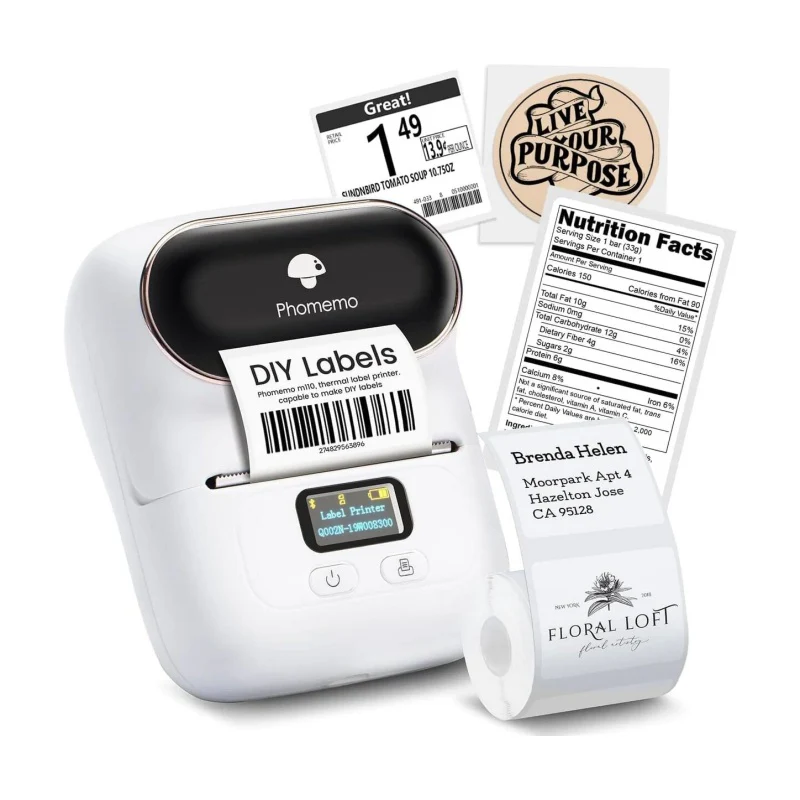
Phomemo M110 Label Maker
- 💖Supports various labels within 20-50 mm
- 💖High Definition: 203 dpi
- 💖Bluetooth Connection with mobile devices
Ready to Shop? Get Discount Code!
Creating DIY coffee stickers is not only a fun and creative activity but also a fantastic way to personalize your coffee experience or enhance your brand's appeal. The Phomemo M110 label maker simplifies the entire process, allowing anyone to design and print professional-quality stickers with ease. Whether you’re decorating your personal coffee mug, packaging gifts, or adding flair to your coffee shop products, the M110 is the perfect tool to bring your ideas to life.
So why not give it a try? Let your creativity shine, and start designing your own coffee stickers today with the Phomemo M110 label maker. And here's the best part: if you purchase now and use the code TIPS8, you'll enjoy a 10% discount on your order. Don't miss out on this opportunity to add a personal touch to your coffee experience while saving money—grab your Phomemo M110 today!





Leave comment