Phomemo TA81 Tattoo Stencil Printer - for Large Tattoos, Bluetooth Tattoo Printer Machine with Roll Transfer Paper, Compatible with Phone/Tablet/PC, Tattoo Supplies for Tattooing Artists & Studio, Standard Printer
This is most likely due to your print speed being set too low or density set too high. Please set your print speed to "5 in/sec" and density to "4" and print.
The exact number for darkness and print speed depends on the type of label you are using. We recommend starting with 4 and 4. If your print is too light, please increase the darkness setting number to get a darker print.
For Mac
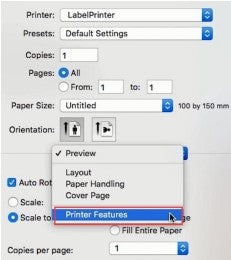
①Select "Printer Features" in "Preview"
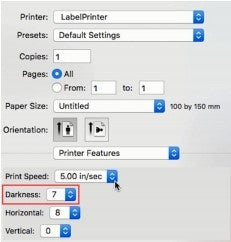
②Set theprintdensityin "Darkness"
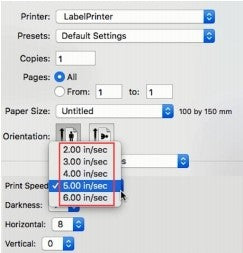
③Set the print speed in "Print Speed"
ForWindows
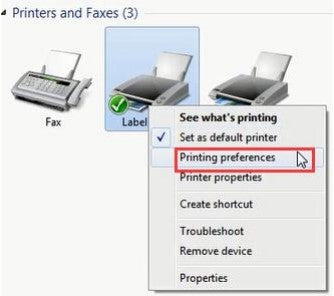
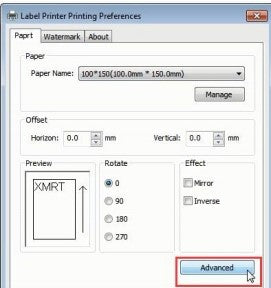
①Open “Devices and Printers” -> right click on “Label Printer” ->choose"Printer Preferences"->click "Advanced"
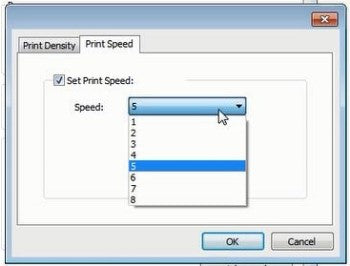
②Settheprint speedin"Speed"
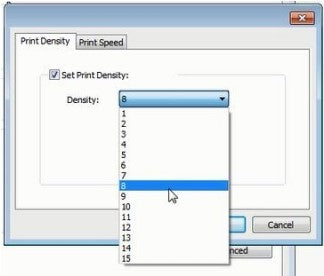
③Set the print density in "Density"
Printer makes loud noise when printing
1.This is most likely due to your print speed being set too low or density set too high. Please set your print speed to '5 in/sec' and density to '4' and print.
2.The exact number for darkness and print speed depends on the type of label you are using. We recommend starting with 4 and 4. If your print is too light, please increase the darkness setting number to get a darker print.
For Mac:
① Select 'Printer Features' in 'Preview'.
② Set the print density in 'Darkness'.
③ Set the print speed in 'Print Speed'.
For Windows:
① Open 'Devices and Printers' -> right click on 'Label Printer' -> choose 'Printer Preferences' -> click 'Advanced'.
② Set the print speed in 'Speed'.
③ Set the print density in 'Density'.





 IT
IT
 EU
EU