You are currently on our US Store.
Switch to the EU Store to enjoy:
🎁 10% OFF your first order
⚡ Faster local shipping & EUR pricing
P
Phomemo PM64D Bluetooth Shipping Label Printer Upgraded Direct Touchscreen
Shop Now
Phomemo M03C Flashcards Mini Printer
Shop Now
Phomemo L85 Smart Touchscreen Professional Tattoo Stencil Printer
Shop Now
Phomemo TA81 Tattoo Stencil Printer - for Large Tattoos, Bluetooth Tattoo Printer Machine with Roll Transfer Paper, Compatible with Phone/Tablet/PC, Tattoo Supplies for Tattooing Artists & Studio, Standard Printer
Shop Now
Phomemo TK32 DIY Temporary Tattoo Maker Kit
Shop Now
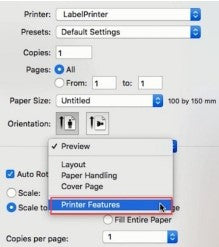
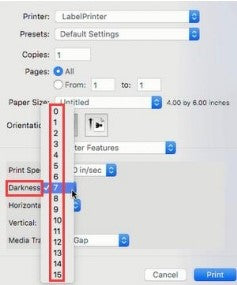
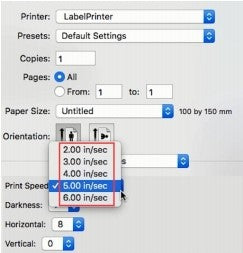
If label is getting stuck (usually during printing something really dark such as a barcode or a thick straight line),this is most likely due to the high print density of your label. This causes the label to get too hot and get stuck to the Printhead.In fact, different labels require different heating temperatures.Set your print speed to "4 in/sec" and density to "2" and try print again. If the label is too light, increase the density by 1.
For Mac
①Select "Printer Features" in "Preview"
②Set the print density in "Darkness"
③Set the print speed in "Print Speed"
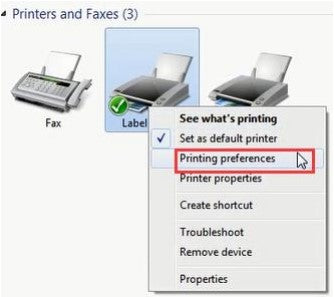
For Windows
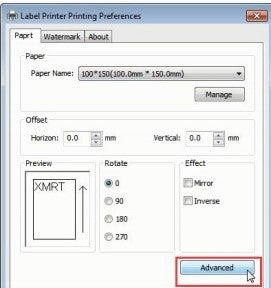
①Open “Devices and Printers”-> right click on “Label Printer”->choose "Printer Preferences"->click "Advanced"
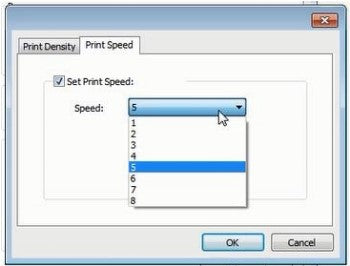
②Set the print speed in "Speed"
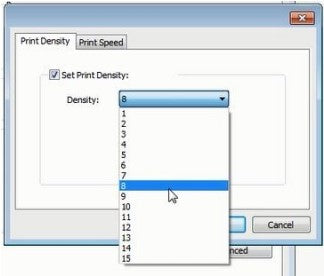
③Set the print density in "Density"
Bestsellers Labels For Business Labels Printer
$15.99
$12.99
$12.79
From materials to transport, we’re working to reduce our carbon footprint to near zero.
Carbonfree Certified
Abuot
Abuot
Subscribe to our newsletter
Get an Exclusive 10% Off Your First Purchase
Mehr kaufen, mehr sparen | Versandbereit
PHOMEMO
Sign In to Receive These Coupons
Sign up now and receive a gift with your first order!
You can sian up to receive notifications
via email and unsubscribe at any time.
You are currently on our US Store.
Switch to the EU Store to enjoy:
🎁 10% OFF your first order
⚡ Faster local shipping & EUR pricing
