ATTENZIONE:Primainstallazione, Per favoregarantirestampante È collegatoE girato SU!
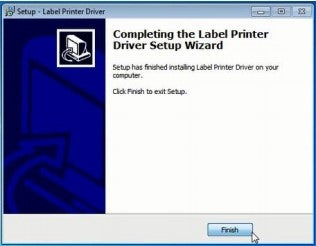
2.SeguireILinstallazionepassi Fino a Voi ricevere Questo messaggio.
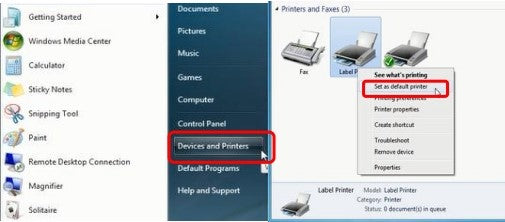
3.Dopo installazione, andare A "Dispositivi E Stampanti” -&gran parte; Giusto clic SU"Etichetta Stampante" -&gran parte;impostato COME predefinitostampante
4.Selezionare IL carta tipo.
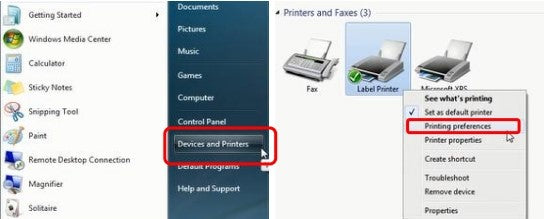
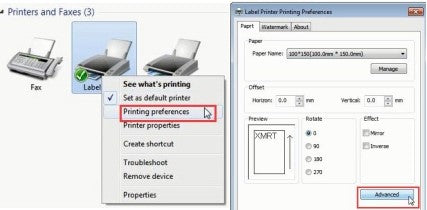
Aprire "Dispositivi E Stampanti” -&gran parte; Giusto clic SU "Etichetta Stampante" -&gran parte; scegliere "Stampante Preferenze”
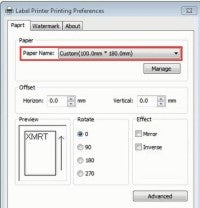
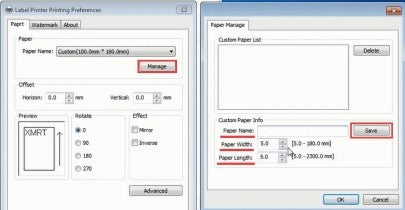
Voi Potere scegliere IL misurare Voi Bisogno In "Carta Nome". Se IL misurare Voi Bisogno È non elencato, Poi clic "Maneggio" A creare le dimensioni necessarie (inserire le dimensioni di "Larghezza carta", "Lunghezza carta" e "Nome carta", quindi fare clic su "Salva" per archiviare).
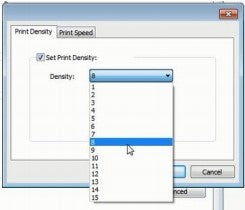
②Seleziona "Stampa Densità". (Densità Potere allineare da 1-15. Fabbrica predefinito È "8".)
Installing Label Printer Driver on Windows and prepare before use
Before installing the driver, ensure the printer is connected to the computer via the printer’s cable. Then proceed to install the printer.
Here is the link to the driver: https://labelife.net/#/pm246s
Sign up now and receive a gift with your first order!
You can sign up to receive notifications via email and unsubscribe at any time.
La scelta di una selezione comporta l'aggiornamento completo della pagina.
Si apre in una nuova finestra.
You seem to be shopping from Europe.
CA
EU
You are currently on our US Store.
Switch to the EU Store to enjoy:
🎁 10% OFF your first order
⚡ Faster local shipping & EUR pricing
We use cookies to ensure the best experience on our website and assist with our marketing efforts. By
continuing to browse, you agree to our cookie policy.





 CA
CA
 EU
EU