You are currently on our US Store.
Switch to the EU Store to enjoy:
🎁 10% OFF your first order
⚡ Faster local shipping & EUR pricing
P
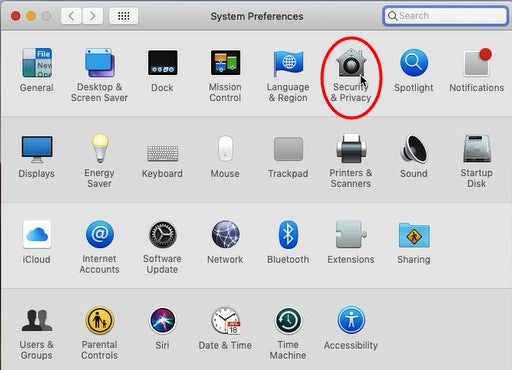
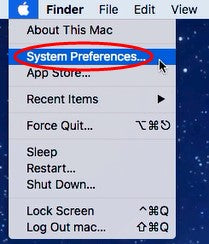
1.Click“
”and go to “System Preferences” -> select “Security&Privacy”
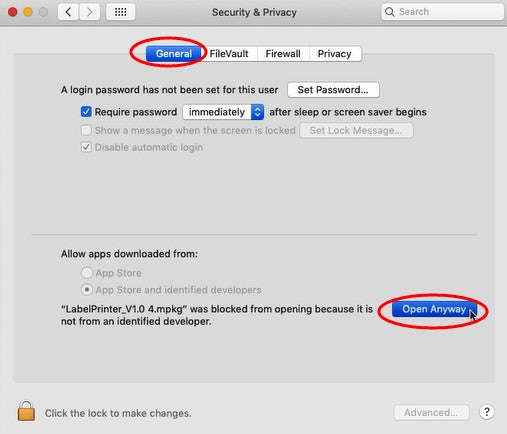
2.Under “General”, click “Open Anyway” to set up

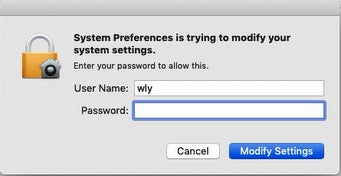
3.Input your “Password” of your Mac. Then click “Modify Settings”.
NOTE: If your Mac does not have a password, then click “Modify Settings”.

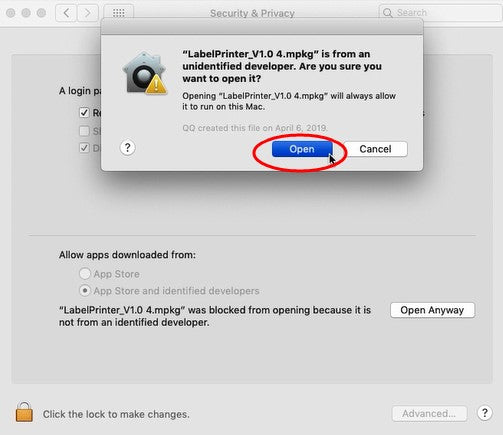
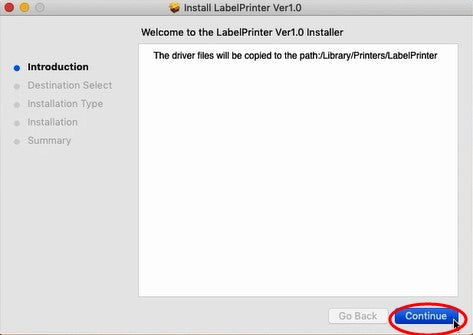
4.Click “Open”, then you can continue to install the driver.
ATTENTION: Before installation please ensure the printer is connected and turned on.


Bestsellers Labels For Business Labels Printer
$15.99
$15.99
$12.99
$12.79
From materials to transport, we’re working to reduce our carbon footprint to near zero.
Carbonfree Certified
About
About
Subscribe to our newsletter
Get an Exclusive 10% Off Your First Purchase
Dear Member, Your Exclusive Free Shipping Is Ready.
PHOMEMO
Unlock Your Black Friday Savings!
Enjoy 15% OFF sitewide, 20% OFF when you buy any 2, and
25% OFF select products.
Sign up for coupons, special offers, new arrivals and unsubscribe at any time.
You are currently on our US Store.
Switch to the EU Store to enjoy:
🎁 10% OFF your first order
⚡ Faster local shipping & EUR pricing
We use cookies to ensure the best experience on our website and assist with our marketing efforts. By continuing to browse, you agree to our cookie policy.
Decline All