You are currently on our US Store.
Switch to the EU Store to enjoy:
🎁 10% OFF your first order
⚡ Faster local shipping & EUR pricing
P
Phomemo PM64D Bluetooth Shipping Label Printer Upgraded Direct Touchscreen
Shop Now
Phomemo M03C Flashcards Mini Printer
Shop Now
Phomemo L85 Smart Touchscreen Professional Tattoo Stencil Printer
Shop Now
Phomemo TA81 Tattoo Stencil Printer - for Large Tattoos, Bluetooth Tattoo Printer Machine with Roll Transfer Paper, Compatible with Phone/Tablet/PC, Tattoo Supplies for Tattooing Artists & Studio, Standard Printer
Shop Now
Phomemo TK32 DIY Temporary Tattoo Maker Kit
Shop Now
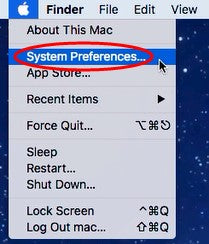
1.Click“
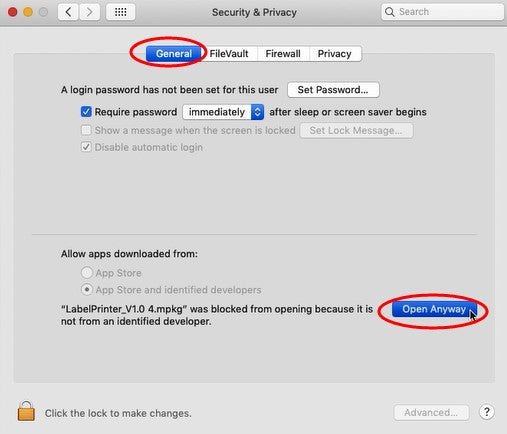
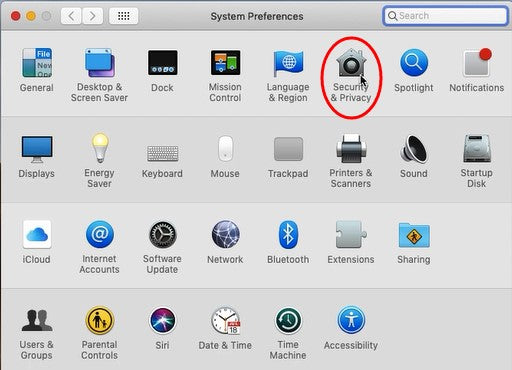
”and go to “System Preferences” -> select “Security&Privacy”
2.Under “General”, click “Open Anyway” to set up

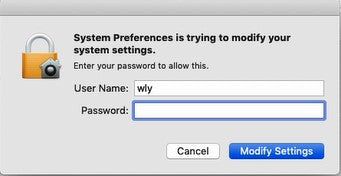
3.Input your “Password” of your Mac. Then click “Modify Settings”.
NOTE: If your Mac does not have a password, then click “Modify Settings”.

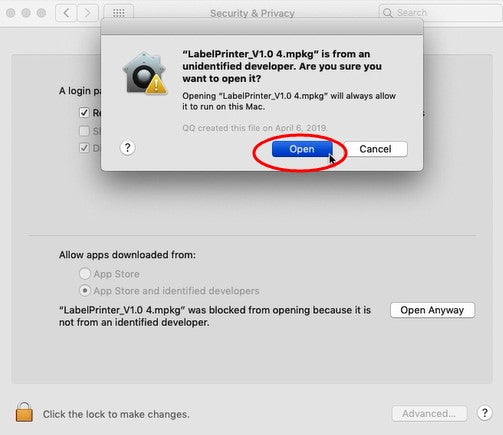
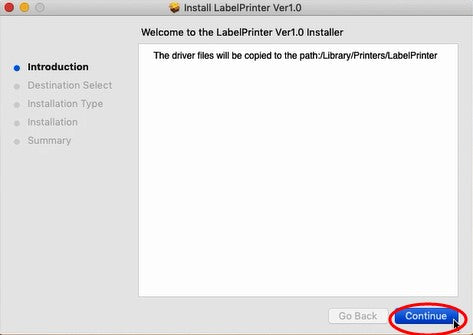
4.Click “Open”, then you can continue to install the driver.
ATTENTION: Before installation please ensure the printer is connected and turned on.


Bestsellers Labels For Business Labels Printer
$15.99
$12.99
$12.79
From materials to transport, we’re working to reduce our carbon footprint to near zero.
Carbonfree Certified
Abuot
Abuot
Subscribe to our newsletter
Get an Exclusive 10% Off Your First Purchase
Mehr kaufen, mehr sparen | Versandbereit
PHOMEMO
Sign In to Receive These Coupons
Sign up now and receive a gift with your first order!
You can sian up to receive notifications
via email and unsubscribe at any time.
You are currently on our US Store.
Switch to the EU Store to enjoy:
🎁 10% OFF your first order
⚡ Faster local shipping & EUR pricing